Function Call和MCP
png)
Function Call和MCP
gogongxt基于API的Function Call大模型调用示例代码
代码示例:
1
2
3
4
5
6
7
8
9
10
11
12
13
14
15
16
17
18
19
20
21
22
23
24
25
26
27
28
29
30
31
32
33
34
35
36
37
38
39
40
41
42
43
44
45
46
47
48
49
50
51
52
53
54
55
56
57
58
59
60
61
62
63
64
65
66
67
68
69
70
71
72
73
74
75
76
77
78
79
80
81
82
83
84
85
86
87
88
89
90
91
92
93
94
95
96
97
98
99
100
101
102
103
104
105
106
107
108
109
110
111
112
113
114
115
116
117
118
119
120
121
122
123
124
125
126
127
128
129
130
131
132
133
134
135
136
137
138
139
140
141
142
143
144
145
146
147
148
149
150
151
152
153
154
155
156
157
158
159
160
161
162
163
164
165
166
167
168
169
170
171
172
173
174
175
176
177
178
179
180
181
182
183
184
185
186
187
188
189
190
191
192
193
194
195
196
import json
import os

from openai import OpenAI


# -----------------------------
# ANSI 颜色日志(无需额外依赖)
# -----------------------------
def color(msg, c):
    return f"\033[{c}m{msg}\033[0m"


def log_info(msg):
    print(color(msg, "32"))  # 绿色


def log_model(msg):
    print(color(msg, "35"))  # 紫色


def log_tool(msg):
    print(color(msg, "36"))  # 青色


def log_error(msg):
    print(color(msg, "31"))  # 红色


model_name = "your-model-name"

client = OpenAI(
    base_url="http://127.0.0.1:5788/v1",
    api_key=os.getenv("OPENAI_API_KEY", "test"),
)

# -----------------------------
# 本地模拟数据:天气查询
# -----------------------------
FAKE_WEATHER = {
    "东京": {"text": "小雨", "low": 5, "high": 9},
    "上海": {"text": "多云", "low": 8, "high": 14},
    "北京": {"text": "晴", "low": 3, "high": 12},
}


# -----------------------------
# 工具:获取天气
# -----------------------------
def get_weather(city: str):
    return FAKE_WEATHER.get(city, {"error": "未知城市"})


# -----------------------------
# 工具:温差计算器
# -----------------------------
def temperature_diff(a: float, b: float):
    return abs(a - b)


# -----------------------------
# 工具结构定义
# -----------------------------
tools = [
    {
        "type": "function",
        "function": {
            "name": "get_weather",
            "description": "查询指定城市天气",
            "parameters": {
                "type": "object",
                "properties": {"city": {"type": "string"}},
                "required": ["city"],
            },
        },
    },
    {
        "type": "function",
        "function": {
            "name": "temperature_diff",
            "description": "计算两个温度之间的温差",
            "parameters": {
                "type": "object",
                "properties": {
                    "a": {"type": "number"},
                    "b": {"type": "number"},
                },
                "required": ["a", "b"],
            },
        },
    },
]

tools_map = {
    "get_weather": get_weather,
    "temperature_diff": temperature_diff,
}


# -----------------------------
# 工具链解析器,支持“多工具调用”
# -----------------------------
def chat(messages):
    while True:
        log_model("📡 调用模型生成回复 ...")
        response = client.chat.completions.create(
            model=model_name,
            messages=messages,
            tools=tools,
            tool_choice="auto",
        )
        print(response)

        choice = response.choices[0]
        msg = choice.message

        # 模型完成自然语言回答
        if choice.finish_reason != "tool_calls":
            log_model("📄 模型返回最终自然语言")
            messages.append(msg)
            return msg.content

        tool_calls = msg.tool_calls
        log_model(f"🧰 模型触发 {len(tool_calls)} 次工具调用")

        messages.append(msg)

        # 逐个执行模型生成的 tool_call
        for call in tool_calls:
            func_name = call.function.name
            args = json.loads(call.function.arguments)

            log_tool(f"🔧 执行工具 {func_name} | 参数: {args}")

            # 调用本地函数
            func = tools_map.get(func_name)
            if not func:
                result = {"error": "未知工具"}
                log_error(f"未知工具:{func_name}")
            else:
                result = func(**args)
                log_tool(f"✨ 工具结果:{result}")

            # 写入 tool 结果
            messages.append(
                {
                    "role": "tool",
                    "tool_call_id": call.id,
                    "content": json.dumps(result, ensure_ascii=False),
                }
            )


# -----------------------------
# 示例对话:一轮触发多工具调用
# -----------------------------
log_info("=" * 80)
log_info("🟩 测试一:")
log_info("=" * 80)
messages = [
    {
        "role": "user",
        "content": ("我想知道东京今天的天气,并且帮我算一下最高温和最低温之间的温差。"),
    }
]
reply = chat(messages)
print("\n", reply)

log_info("=" * 80)
log_info("🟩 测试二:")
log_info("=" * 80)
messages.append(
    {
        "role": "user",
        "content": ("我还想知道今天上海的天气,并且帮我算一下上海和东京的温差。"),
    }
)
reply = chat(messages)
print("\n", reply)

log_info("=" * 80)
log_info("打印完全拼接起来的message")
log_info("=" * 80)
# Convert ChatCompletionMessage objects to dictionaries for JSON serialization
messages_dict = []
for msg in messages:
    if hasattr(msg, "model_dump"):
        messages_dict.append(msg.model_dump())
    elif hasattr(msg, "dict"):
        messages_dict.append(msg.dict())
    elif isinstance(msg, dict):
        messages_dict.append(msg)
    else:
        # Fallback: convert object to dictionary
        messages_dict.append(vars(msg))
print(json.dumps(messages_dict, indent=2, ensure_ascii=False))
上面的代码执行结果:
1
2
3
4
5
6
7
8
9
10
11
12
13
14
15
16
17
18
19
20
21
22
23
24
25
26
27
28
29
30
31
32
33
34
35
36
37
38
39
40
41
42
43
44
45
46
47
48
49
50
51
52
53
54
55
56
57
58
59
60
61
62
63
64
65
66
67
68
69
70
71
72
73
74
75
76
77
78
79
80
81
82
83
84
85
86
87
88
89
90
91
92
93
94
95
96
97
98
99
100
101
102
103
104
105
106
107
108
109
110
111
112
113
114
115
116
117
118
119
120
121
122
123
124
125
126
127
128
129
130
131
132
133
134
135
136
137
138
139
140
141
142
143
144
145
146
147
148
149
150
151
152
153
154
155
156
157
158
159
160
161
162
163
164
165
166
167
168
169
================================================================================
🟩 测试一:
================================================================================
📡 调用模型生成回复 ...
ChatCompletion(id='4fbcc2ab518548e1a48b607681f3c993', choices=[Choice(finish_reason='tool_calls', index=0, logprobs=None, message=ChatCompletionMessage(content=None, refusal=None, role='assistant', annotations=None, audio=None, function_call=None, tool_calls=[ChatCompletionMessageFunctionToolCall(id='call_6062c850f9a0488fa75db940', function=Function(arguments='{"city": "东京"}', name='get_weather'), type='function', index=-1)], reasoning_content=None), matched_stop=None)], created=1764747208, model='your-model-name', object='chat.completion', service_tier=None, system_fingerprint=None, usage=CompletionUsage(completion_tokens=20, prompt_tokens=222, total_tokens=242, completion_tokens_details=None, prompt_tokens_details=None, reasoning_tokens=0), metadata={'weight_version': 'default'})
🧰 模型触发 1 次工具调用
🔧 执行工具 get_weather | 参数: {'city': '东京'}
✨ 工具结果:{'text': '小雨', 'low': 5, 'high': 9}
📡 调用模型生成回复 ...
ChatCompletion(id='259a376d790047aab5d2cf6a7e24b76f', choices=[Choice(finish_reason='tool_calls', index=0, logprobs=None, message=ChatCompletionMessage(content=None, refusal=None, role='assistant', annotations=None, audio=None, function_call=None, tool_calls=[ChatCompletionMessageFunctionToolCall(id='call_7992868c16034563b4e56fd5', function=Function(arguments='{"a": 9, "b": 5}', name='temperature_diff'), type='function', index=-1)], reasoning_content=None), matched_stop=None)], created=1764747208, model='your-model-name', object='chat.completion', service_tier=None, system_fingerprint=None, usage=CompletionUsage(completion_tokens=26, prompt_tokens=273, total_tokens=299, completion_tokens_details=None, prompt_tokens_details=PromptTokensDetails(audio_tokens=None, cached_tokens=241), reasoning_tokens=0), metadata={'weight_version': 'default'})
🧰 模型触发 1 次工具调用
🔧 执行工具 temperature_diff | 参数: {'a': 9, 'b': 5}
✨ 工具结果:4
📡 调用模型生成回复 ...
ChatCompletion(id='10a9d55f6f3e4105981da24002a501bd', choices=[Choice(finish_reason='stop', index=0, logprobs=None, message=ChatCompletionMessage(content='东京今天天气为小雨,最高气温为9°C,最低气温为5°C,温差为4°C。', refusal=None, role='assistant', annotations=None, audio=None, function_call=None, tool_calls=None, reasoning_content=None), matched_stop=151645)], created=1764747209, model='your-model-name', object='chat.completion', service_tier=None, system_fingerprint=None, usage=CompletionUsage(completion_tokens=26, prompt_tokens=313, total_tokens=339, completion_tokens_details=None, prompt_tokens_details=PromptTokensDetails(audio_tokens=None, cached_tokens=298), reasoning_tokens=0), metadata={'weight_version': 'default'})
📄 模型返回最终自然语言

 东京今天天气为小雨,最高气温为9°C,最低气温为5°C,温差为4°C。
================================================================================
🟩 测试二:
================================================================================
📡 调用模型生成回复 ...
ChatCompletion(id='adae49ca61e4462c8bcc9ef3901bfbd5', choices=[Choice(finish_reason='tool_calls', index=0, logprobs=None, message=ChatCompletionMessage(content=None, refusal=None, role='assistant', annotations=None, audio=None, function_call=None, tool_calls=[ChatCompletionMessageFunctionToolCall(id='call_8d37a5cf7eb74ea6ad1f416b', function=Function(arguments='{"city": "上海"}', name='get_weather'), type='function', index=-1)], reasoning_content=None), matched_stop=None)], created=1764747209, model='your-model-name', object='chat.completion', service_tier=None, system_fingerprint=None, usage=CompletionUsage(completion_tokens=20, prompt_tokens=366, total_tokens=386, completion_tokens_details=None, prompt_tokens_details=PromptTokensDetails(audio_tokens=None, cached_tokens=338), reasoning_tokens=0), metadata={'weight_version': 'default'})
🧰 模型触发 1 次工具调用
🔧 执行工具 get_weather | 参数: {'city': '上海'}
✨ 工具结果:{'text': '多云', 'low': 8, 'high': 14}
📡 调用模型生成回复 ...
ChatCompletion(id='89a1febfc52440919d407330b528af65', choices=[Choice(finish_reason='tool_calls', index=0, logprobs=None, message=ChatCompletionMessage(content=None, refusal=None, role='assistant', annotations=None, audio=None, function_call=None, tool_calls=[ChatCompletionMessageFunctionToolCall(id='call_072794f086a64b6d95b08648', function=Function(arguments='{"a": 14, "b": 9}', name='temperature_diff'), type='function', index=-1)], reasoning_content=None), matched_stop=None)], created=1764747209, model='your-model-name', object='chat.completion', service_tier=None, system_fingerprint=None, usage=CompletionUsage(completion_tokens=27, prompt_tokens=418, total_tokens=445, completion_tokens_details=None, prompt_tokens_details=PromptTokensDetails(audio_tokens=None, cached_tokens=385), reasoning_tokens=0), metadata={'weight_version': 'default'})
🧰 模型触发 1 次工具调用
🔧 执行工具 temperature_diff | 参数: {'a': 14, 'b': 9}
✨ 工具结果:5
📡 调用模型生成回复 ...
ChatCompletion(id='365d2f46ab2844c9aa98c7ee20034122', choices=[Choice(finish_reason='stop', index=0, logprobs=None, message=ChatCompletionMessage(content='上海今天天气为多云,最高气温为14°C,最低气温为8°C。上海的最高气温比东京的最高气温高5°C。', refusal=None, role='assistant', annotations=None, audio=None, function_call=None, tool_calls=None, reasoning_content=None), matched_stop=151645)], created=1764747210, model='your-model-name', object='chat.completion', service_tier=None, system_fingerprint=None, usage=CompletionUsage(completion_tokens=34, prompt_tokens=459, total_tokens=493, completion_tokens_details=None, prompt_tokens_details=PromptTokensDetails(audio_tokens=None, cached_tokens=444), reasoning_tokens=0), metadata={'weight_version': 'default'})
📄 模型返回最终自然语言

 上海今天天气为多云,最高气温为14°C,最低气温为8°C。上海的最高气温比东京的最高气温高5°C。
================================================================================
打印完全拼接起来的message
================================================================================
[
  {
    "role": "user",
    "content": "我想知道东京今天的天气,并且帮我算一下最高温和最低温之间的温差。"
  },
  {
    "content": null,
    "refusal": null,
    "role": "assistant",
    "annotations": null,
    "audio": null,
    "function_call": null,
    "tool_calls": [
      {
        "id": "call_6062c850f9a0488fa75db940",
        "function": {
          "arguments": "{\"city\": \"东京\"}",
          "name": "get_weather"
        },
        "type": "function",
        "index": -1
      }
    ],
    "reasoning_content": null
  },
  {
    "role": "tool",
    "tool_call_id": "call_6062c850f9a0488fa75db940",
    "content": "{\"text\": \"小雨\", \"low\": 5, \"high\": 9}"
  },
  {
    "content": null,
    "refusal": null,
    "role": "assistant",
    "annotations": null,
    "audio": null,
    "function_call": null,
    "tool_calls": [
      {
        "id": "call_7992868c16034563b4e56fd5",
        "function": {
          "arguments": "{\"a\": 9, \"b\": 5}",
          "name": "temperature_diff"
        },
        "type": "function",
        "index": -1
      }
    ],
    "reasoning_content": null
  },
  {
    "role": "tool",
    "tool_call_id": "call_7992868c16034563b4e56fd5",
    "content": "4"
  },
  {
    "content": "东京今天天气为小雨,最高气温为9°C,最低气温为5°C,温差为4°C。",
    "refusal": null,
    "role": "assistant",
    "annotations": null,
    "audio": null,
    "function_call": null,
    "tool_calls": null,
    "reasoning_content": null
  },
  {
    "role": "user",
    "content": "我还想知道今天上海的天气,并且帮我算一下上海和东京的温差。"
  },
  {
    "content": null,
    "refusal": null,
    "role": "assistant",
    "annotations": null,
    "audio": null,
    "function_call": null,
    "tool_calls": [
      {
        "id": "call_8d37a5cf7eb74ea6ad1f416b",
        "function": {
          "arguments": "{\"city\": \"上海\"}",
          "name": "get_weather"
        },
        "type": "function",
        "index": -1
      }
    ],
    "reasoning_content": null
  },
  {
    "role": "tool",
    "tool_call_id": "call_8d37a5cf7eb74ea6ad1f416b",
    "content": "{\"text\": \"多云\", \"low\": 8, \"high\": 14}"
  },
  {
    "content": null,
    "refusal": null,
    "role": "assistant",
    "annotations": null,
    "audio": null,
    "function_call": null,
    "tool_calls": [
      {
        "id": "call_072794f086a64b6d95b08648",
        "function": {
          "arguments": "{\"a\": 14, \"b\": 9}",
          "name": "temperature_diff"
        },
        "type": "function",
        "index": -1
      }
    ],
    "reasoning_content": null
  },
  {
    "role": "tool",
    "tool_call_id": "call_072794f086a64b6d95b08648",
    "content": "5"
  },
  {
    "content": "上海今天天气为多云,最高气温为14°C,最低气温为8°C。上海的最高气温比东京的最高气温高5°C。",
    "refusal": null,
    "role": "assistant",
    "annotations": null,
    "audio": null,
    "function_call": null,
    "tool_calls": null,
    "reasoning_content": null
  }
]
一、Function Calling
2.1 要解决的问题
传统聊天大模型只会说话,没有工具调用能力 ,这使得大模型:
- 无法感知环境: 无法与外部数据源交互,如通过 API 查询网页、查看用户本地文件、访问远程数据库等等
- 无法改变环境: 无法帮用户实际执行任务,如跑代码、发邮件、上传作业等
2.2 如何解决问题
后端 + LLM
传统方案
工作流程
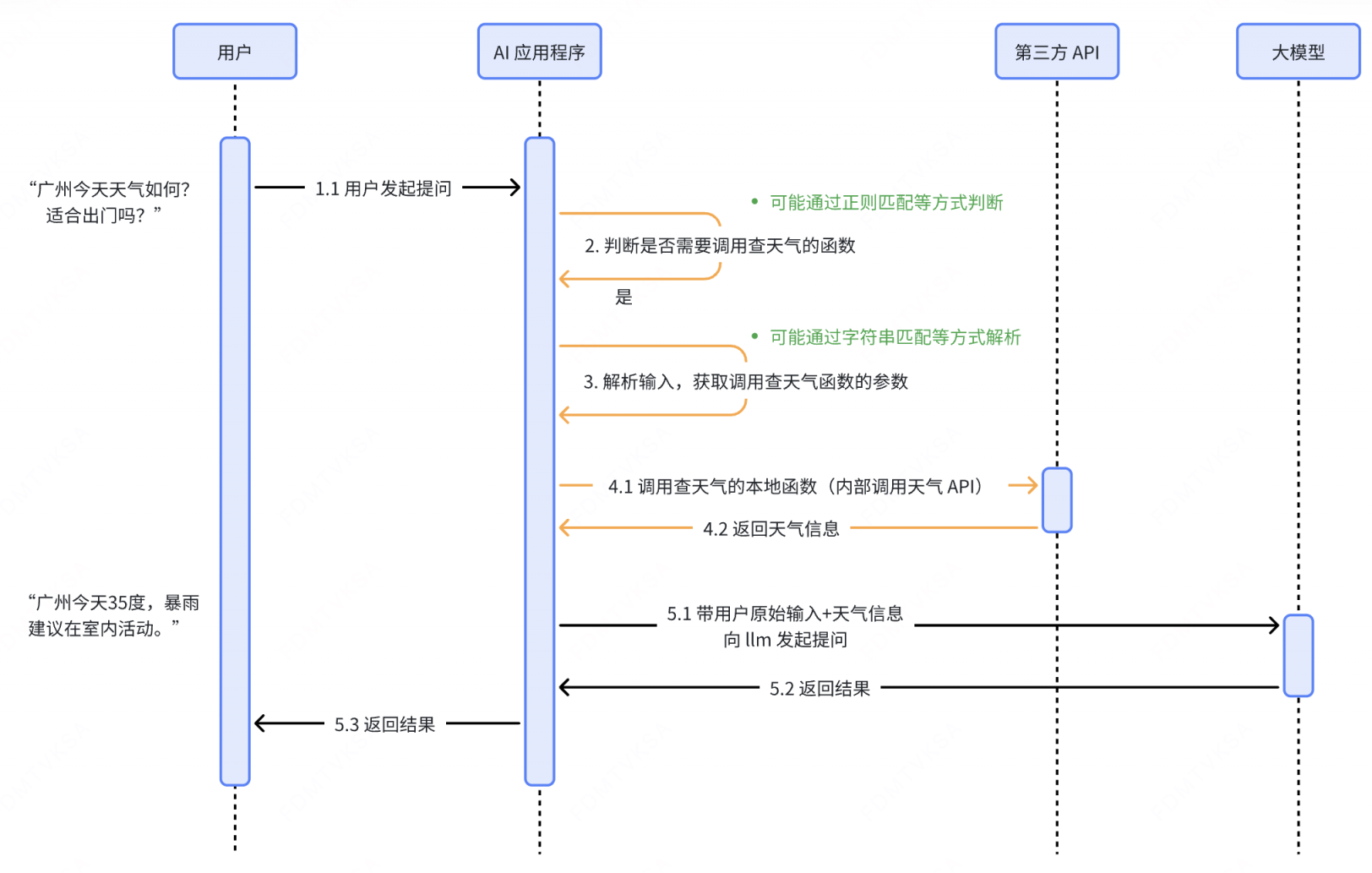
存在的问题
- 是否调用工具、调用什么工具由后端负责判断,逻辑复杂且容易误判。
AI 这么智能,为什么不让它来帮我判断?
- 调用工具的参数由后端负责构建,难度很大。
AI 这么智能,为什么不让它来帮我生成参数?
Function Calling 方案
Function Calling 是什么
广义的 Function Calling 是指让大模型能够调用外部工具的一种技术实现:先向大模型提供可用函数的列表及说明,由大模型在对话过程中智能判断是否需要调用函数,并自动生成调用所需的参数,最终 用文字返回符合约定格式的函数调用请求 。
狭义的 Function Calling 特指大模型提供商在模型内部与 API 层面做了支持的一种能力,它最早由 OpenAI 引入:
- 在模型层面 :模型提供商需对大模型进行特别优化,使其具备根据上下文正确选择合适函数、生成有效参数的能力(比如有监督微调、强化学习)。
- 在 API 层面 :模型提供商需额外开放对 Function
Calling 的支持(比如 GPT API 中提供了一个
functions参数)。
基于提示词的 Function Calling
工作流程
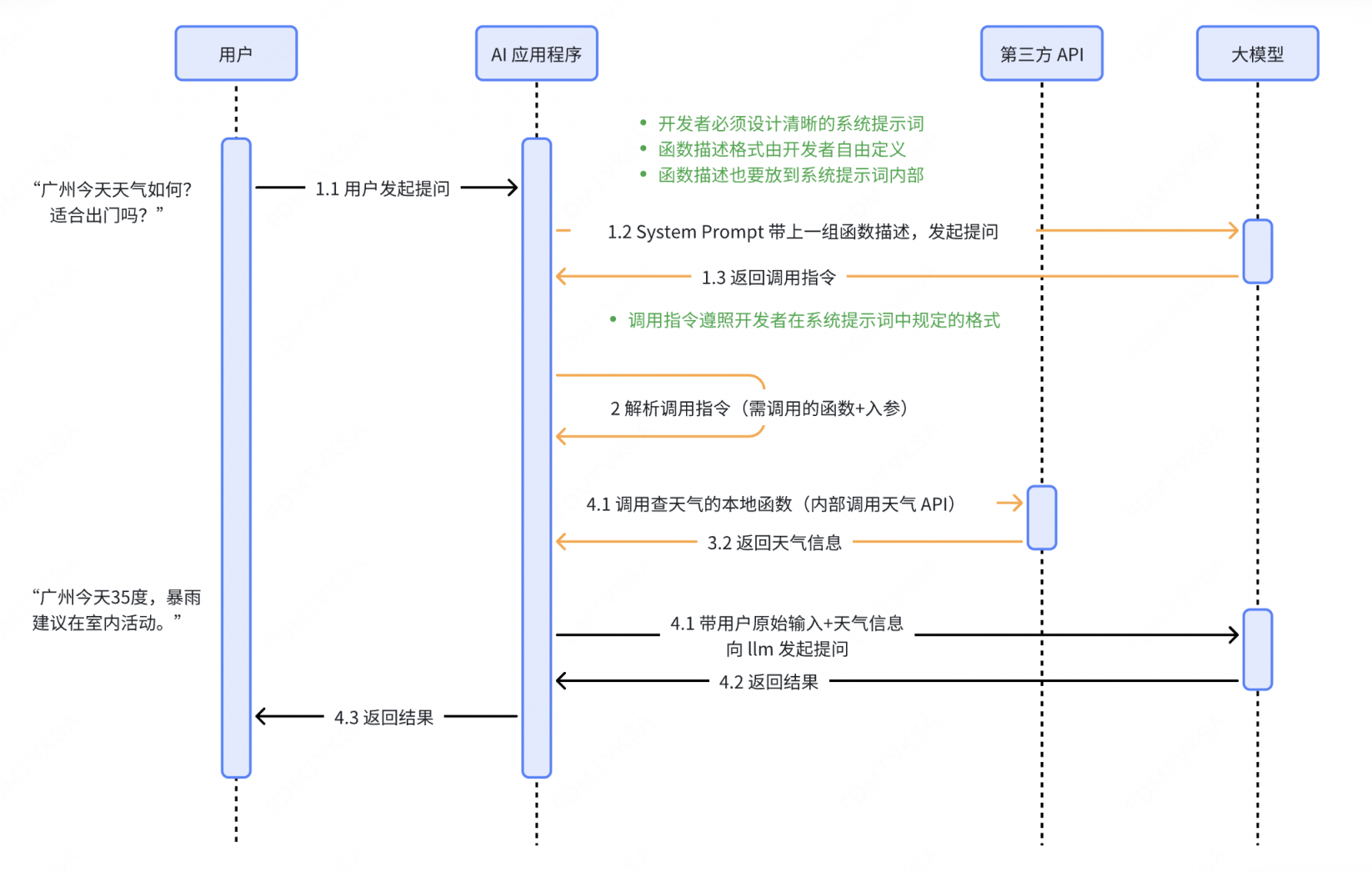
1
2
3
4
5
6
7
8
9
10
11
12
13
14
15
16
17
18
19
20
21
22
23
24
# 你的角色

你是一个函数调用助手,我将提供多个函数的定义信息,包括函数名称、作用、参数及参数类型。

# 你的任务

- 根据用户的输入,判断是否需要调用某个函数
- 如果需要,请**严格按照以下格式**输出函数调用指令:

```json
{ "name": "函数名", "arguments": { "参数名": "参数值" } }
```

# 函数定义信息

1. **get_weather**
   - 作用:查询指定城市的天气情况
   - 参数:
     -`city`(string):城市名称
2. **get_time**
   - 作用:查询指定城市的当前时间
   - 参数:
     - `city`(string):城市名称
用户提问: “广州的天气怎么样?”
模型返回: { “name”: “get_weather”, “arguments”: { “city”: “广州” }
存在的问题
输出格式不稳定。如调用指令中存在多余自然语言。
容易出现幻觉。模型可能编造并不存在的函数名或参数。
大模型提供商能否对模型进行微调、强化学习,提升大模型在这一方面的能力?
对开发者依赖度高。 函数描述、调用指令格式、提示词逻辑完全由开发者设计。
函数描述、调用指令格式能否由大模型提供商来指定?系统提示词中的“说明与规则”逻辑能否由大模型提供商来兜底?
上下文冗长,Token 消耗大。 为确保调用逻辑正确,往往需要在 system prompt 中加入大量说明与规则。
基于 API 的 Function Calling
工作流程
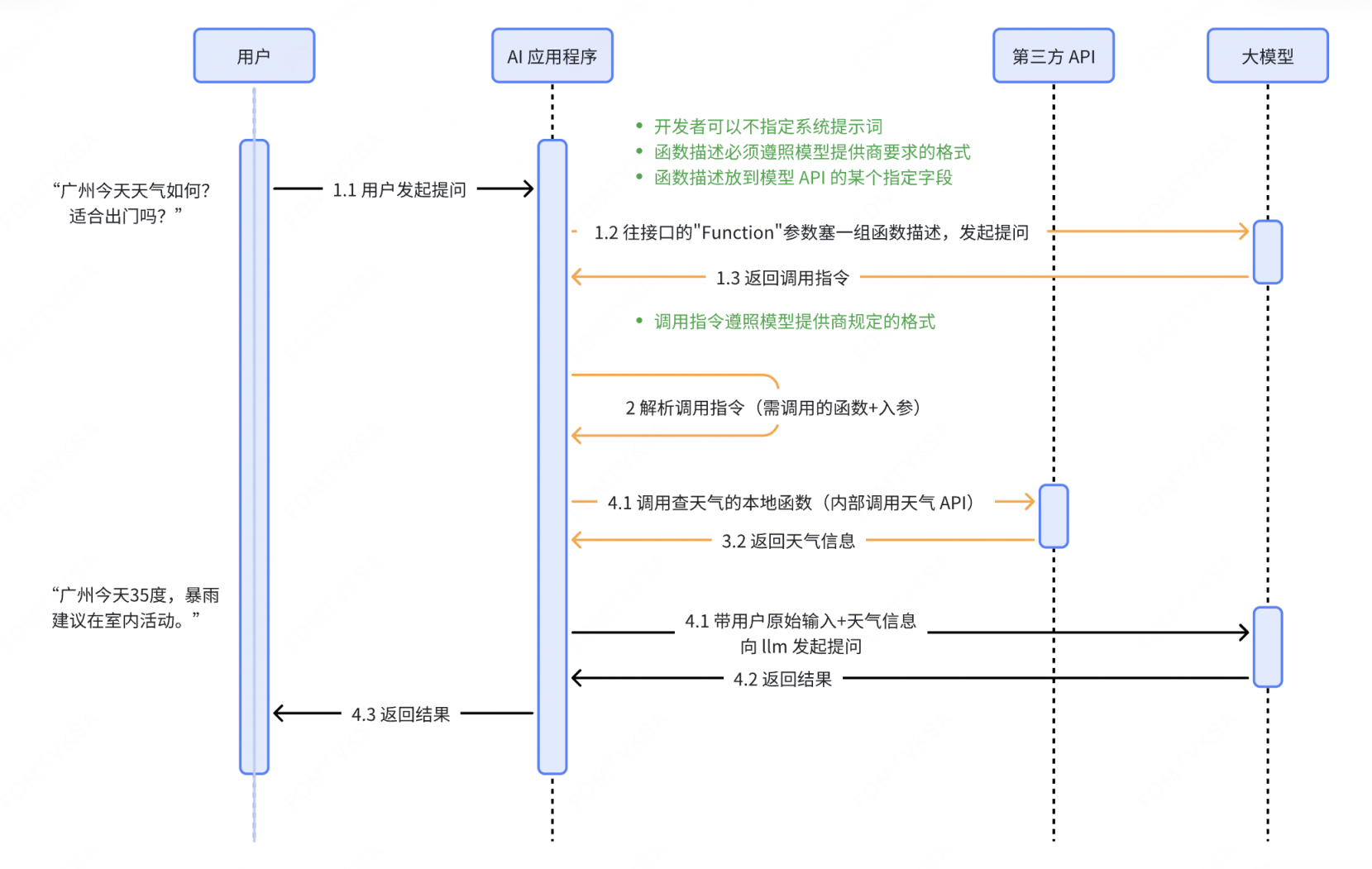
用户发起提问 用户通过自然语言提出问题,例如:“广州今天天气如何?适合出门吗?”
后端第一次向大模型 API 发起请求,获取函数调用指令
后端向大模型 API 传入用户原始输入、函数描述和其他上下文信息,获取调用指令。函数描述包括函数名称、用途说明、参数结构等。
1
2
3
4
5
6
7
8
9
10
11
12
13
14
15
16
17
18
19
20
21
22
23
24
25
26
27
28
29
30
31
32
{ "messages": [ { "role": "system", "content": "你是一个助手,可以根据用户的请求调用工具来获取信息。" }, { "role": "user", "content": "广州今天天气如何?适合出门吗?" } ], "functions": [ { "name": "getWeather", "description": "获取指定城市的天气", "parameters": { "type": "object", "properties": { "location": { "type": "string", "description": "城市名称,比如北京" }, "date": { "type": "string", "description": "日期,比如 2025-08-07" } }, "required": ["location", "date"] } } ] }模型生成调用指令
模型会智能判断是否需要调用函数,选择合适的函数,并基于上下文自动生成结构化的调用指令(函数名 + 参数),例如:
1
2
3
4
5
6
7
8
9
{ "function_call": { "name": "getWeather", "arguments": { "location": "Guangzhou", "date": "2025-07-17" } } }后端解析调用指令,并执行实际的函数调用
后端接收到模型返回的调用指令后,解析调用指令,得到函数名称和参数,执行对应的方法(如调用天气查询函数),并获取结果。调用指令例如:
后端第二次向大模型 API 发起请求,将刚才的调用结果和其他上下文信息一起传给模型,生成最终的回复
后端将函数执行结果 + 其他上下文信息(包括用户原始输入)传给模型,模型判断此时已有足够的信息回答问题,不再需要调用函数了,于是直接生成最终结果,例如:“广州今天35度,暴雨,建议在室内活动”。
存在的问题
- 后端应用适配不同大模型时存在大量冗余开发
- 可选模型有限
二、MCP 协议
3.1 要解决的问题
工具接入的冗余开发问题
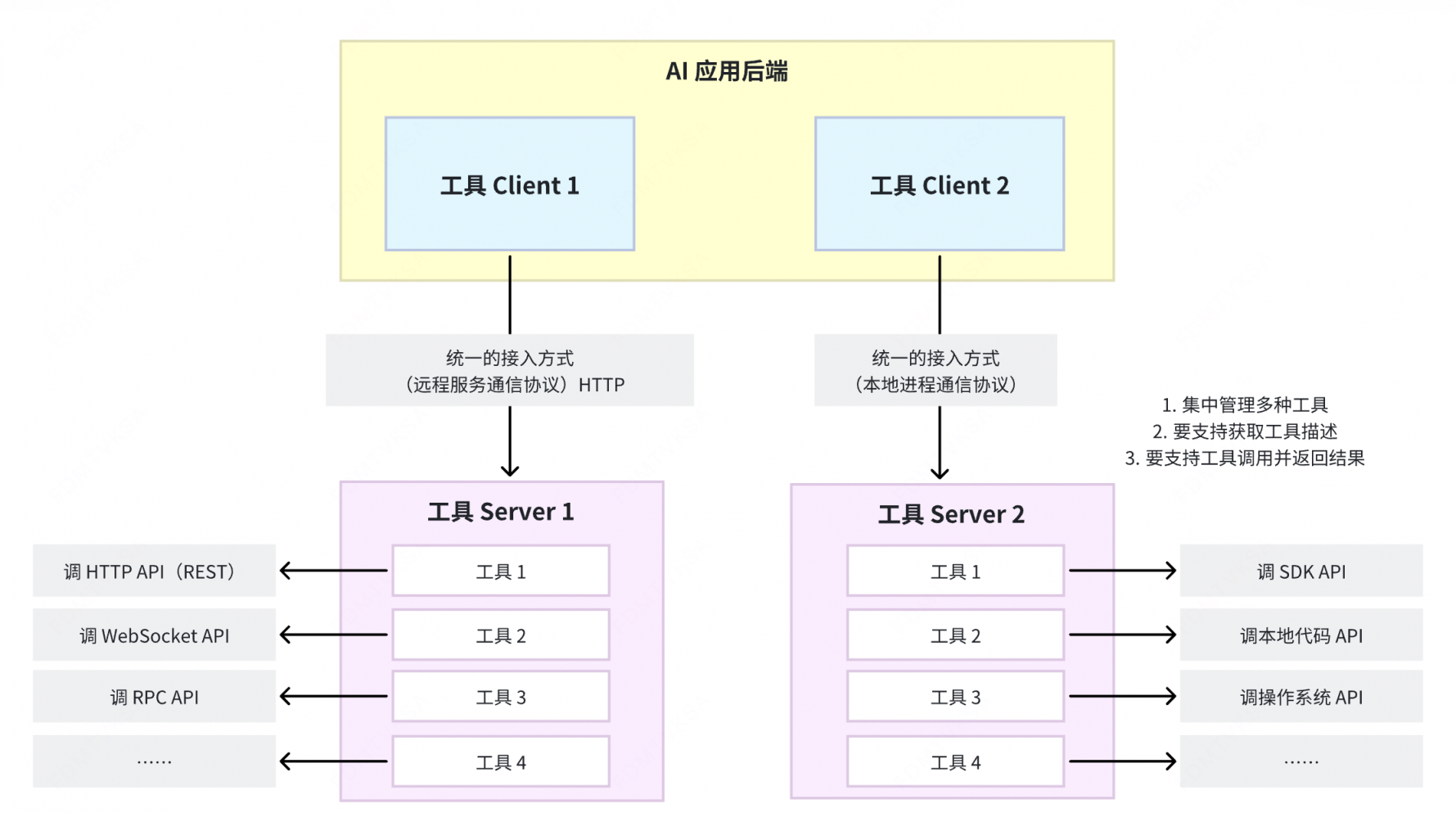
AI 应用接入他人开发的新工具需完整 copy 代码和函数描述,接入几个就要 copy 几次。
工具复用困难
环境问题导致 copy 的代码不一定能跑;很多企业不提供可供 copy 的源码;跨语言的代码 copy 了没用。
系统架构设计
3.3 MCP 协议是什么
- 诞生:
- 2024 年 11 月由 Anthropic(一家美国人工智能初创公司)提出,官方文档。
- 定义:
- MCP is an open protocol that standardizes how applications provide context to large language models (LLMs). Think of MCP like a USB-C port for AI applications. Just as USB-C provides a standardized way to connect your devices to various peripherals and accessories, MCP provides a standardized way to connect AI models to different data sources and tools. MCP enables you build agents and complex workflows on top of LLMs and connects your models with the world. [1]
- MCP 是一个开放协议,用于标准化应用程序向大语言模型(LLM)提供上下文的方式。你可以把 MCP 想象成 AI 应用的 USB-C 接口——正如 USB-C 提供了一种将设备连接到各种外设和配件的标准化方式一样,MCP 提供了一种将 AI 模型连接到不同数据源和工具的标准化方式。借助 MCP,你可以在 LLM 之上构建智能体和复杂工作流,并将你的模型与外部世界相连接。
- 如何理解:
- 应用程序:集成了 LLM 的具体应用。包括各家大模型的在线对话网站、集成了大模型的IDE(如 Claude desktop)、各种 Agent(比如 Cursor 就是一个 Agent)、以及其他接入了大模型的普通应用。
- 上下文:指的是模型在决策时可访问的所有信息,如当前用户输入、历史对话信息、外部工具(tool)信息、外部数据源(resource)信息、提示词(prompt)信息等等(这里重点只讲工具)。
和传统 API 的区别?
3.4 MCP 核心架构
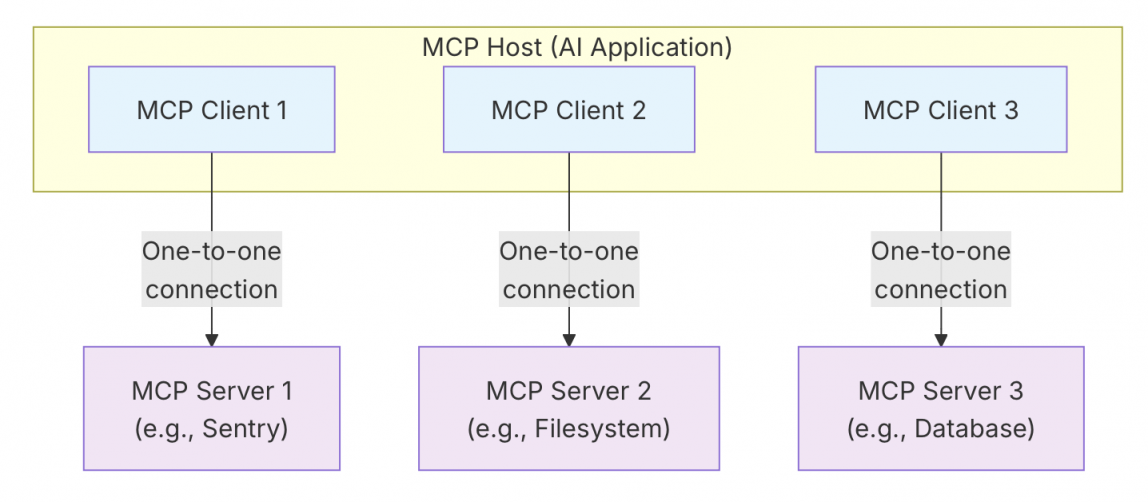
MCP follows a client-server architecture where an MCP host — an AI application like Claude Code or Claude Desktop — establishes connections to one or more MCP servers. The MCP host accomplishes this by creating one MCP client for each MCP server. Each MCP client maintains a dedicated one-to-one connection with its corresponding MCP server.The key participants in the MCP architecture are:
- MCP Host: The AI application that coordinates and manages one or multiple MCP clients
- MCP Client: A component that maintains a connection to an MCP server and obtains context from an MCP server for the MCP host to use
- MCP Server: A program that provides context to MCP clients
For example: Visual Studio Code acts as an MCP host. When Visual Studio Code establishes a connection to an MCP server, such as the Sentry MCP server, the Visual Studio Code runtime instantiates an MCP client object that maintains the connection to the Sentry MCP server. When Visual Studio Code subsequently connects to another MCP server, such as the local filesystem server, the Visual Studio Code runtime instantiates an additional MCP client object to maintain this connection, hence maintaining a one-to-one relationship of MCP clients to MCP servers.Note that MCP server refers to the program that serves context data, regardless of where it runs. MCP servers can execute locally or remotely. For example, when Claude Desktop launches the filesystem server, the server runs locally on the same machine because it uses the STDIO transport. This is commonly referred to as a “local” MCP server. The officialSentry MCP server runs on the Sentry platform, and uses the Streamable HTTP transport. This is commonly referred to as a “remote” MCP server. [2]
MCP遵循客户端-服务器架构,其中 MCP Host——Claude Code 或 Claude Desktop 等AI应用程序——与一个或多个MCP Server 建立连接。MCP 主机通过为每个 MCP Server 创建一个 MCP Client 来实现这一目标。每个 MCP Client 都与相应的 MCP Server 保持专用的一对一连接。MCP架构的主要组成者是:
- MCP Host:协调和管理一个或多个 MCP Client 的人工智能应用程序
- MCP Client:一个组件,用于维护与 MCP 服务器的连接,并从 MCP 服务器获取上下文,供 MCP 主机使用
- MCP Server:一个为 MCP Client 提供上下文的程序
3.5 MCP 的传输协议
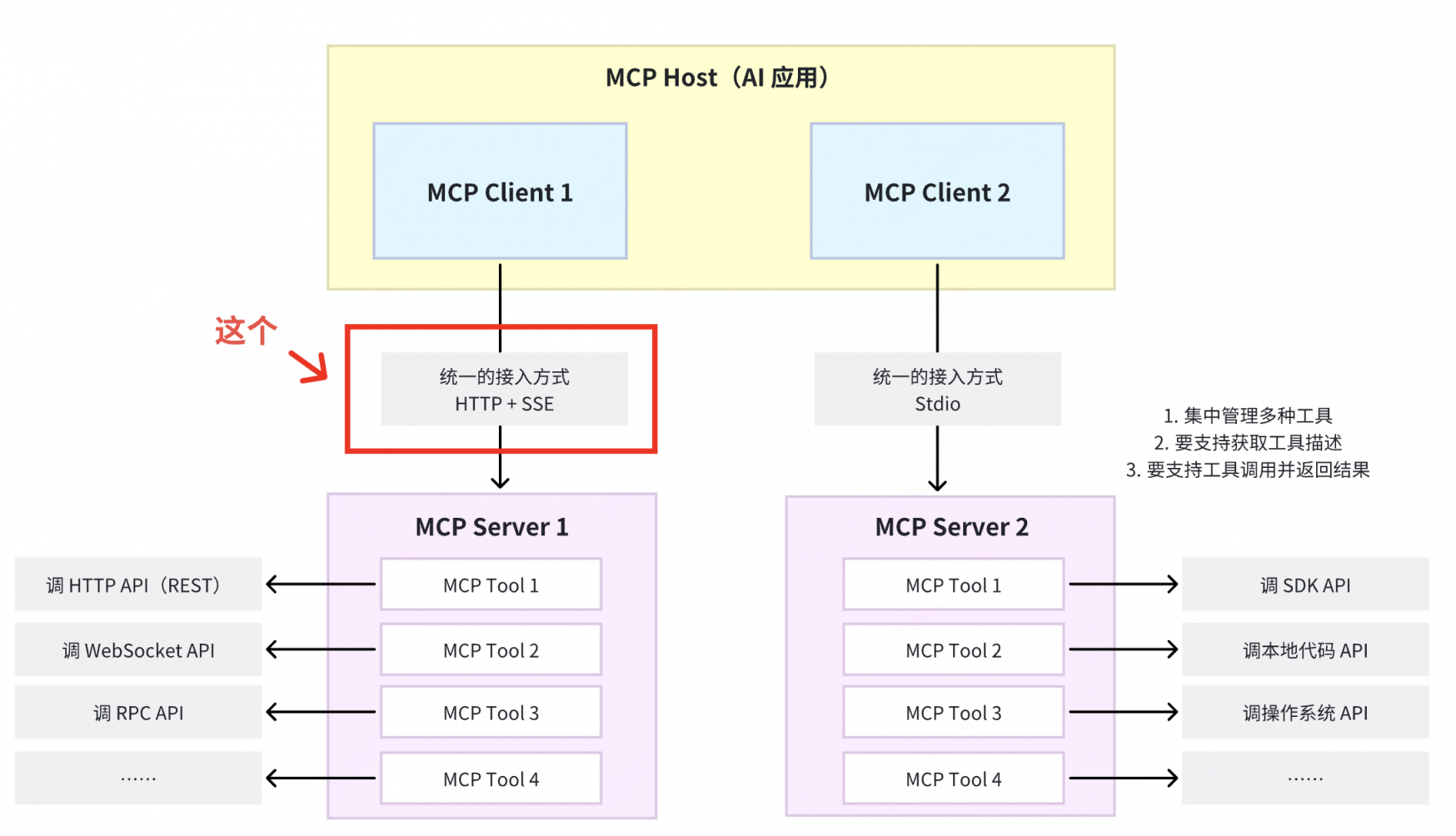
MCP supports two transport mechanisms:
- Stdio transport: Uses standard input/output streams for direct process communication between local processes on the same machine, providing optimal performance with no network overhead.
- Streamable HTTP transport: Uses HTTP POST for client-to-server messages with optional Server-Sent Events for streaming capabilities. This transport enables remote server communication and supports standard HTTP authentication methods including bearer tokens, API keys, and custom headers. MCP recommends using OAuth to obtain authentication tokens.
The transport layer abstracts communication details from the protocol layer, enabling the same JSON-RPC 2.0 message format across all transport mechanisms.[ 3]
Stdio 传输
Stdio 传输本质上是 本地进程间通信(IPC)的一种形式,它最常用的底层机制就是管道(pipe)。
什么是 stdio? stdio(standard I/O)是进程的标准输入/输出接口。每个进程启动时,操作系统会给它分配 三个文件描述符:
1
2
3
0 → stdin (标准输入,默认是键盘) 1 → stdout (标准输出,默认是屏幕) 2 → stderr (标准错误输出,默认是屏幕)程序里的
printf、scanf、cin、cout、read、write都是通过这些接口和外界交换数据的。什么是管道(pipe)?
- 管道是操作系统内核提供的一种进程间通信(IPC)机制,它允许一个进程的输出直接作为另一个进程的输入,实现数据在两个进程之间的流动。
总结:什么是 Stdio 传输 ?
- 所谓 Stdio 传输,就是通过标准输入和标准输出这两个数据流来传输数据、通过管道来连接两个进程的标准输入/输出接口,使得一个进程的输出直接传给另一个进程输入,实现进程间数据传输(本质上是一个基于字节流的全双工通信通道)
- stdio 是接口,管道是连接这接口的通道。
HTTP + SSE 传输(旧方案,2024.10)
客户端通过 HTTP POST 向服务端发请求,服务端通过 SSE 通道返回响应结果。
- SSE(Server-Sent Events服务器发送事件),是一种服务器单向推送数据给客户端的技术,基于 HTTP 协议。
- 基本原理
- 客户端先向服务端发起一个普通的 HTTP 请求。
- 服务端保持这个连接不断开,以
text/event-stream作为响应类型,源源不断地往里写数据。 - 客户端收到数据后会触发相应的事件回调(比如浏览器前端实时更新界面)。
- 和普通 HTTP 的核心差异
- 支持服务端 主动、流式 地推送消息
为什么在这么多远程服务调用的协议中选了 HTTP + SSE?
- 服务端推送的必要性:MCP Server 中的工具发生了更新,需要主动向 MCP Client 推送通知
Why Notifications Matter
This notification system is crucial for several reasons:
- Dynamic Environments: Tools may come and go based on server state, external dependencies, or user permissions
- Efficiency: Clients don’t need to poll for changes; they’re notified when updates occur
- Consistency: Ensures clients always have accurate information about available server capabilities
- Real-time Collaboration: Enables responsive AI applications that can adapt to changing contexts
This notification pattern extends beyond tools to other MCP primitives, enabling comprehensive real-time synchronization between clients and servers. [4]
Streamable HTTP 传输(新方案,2025.03)
HTTP + SSE 传输方案的升级版,目前正在逐步取代原有的 HTTP + SSE 传输方案
- Streamable HTTP
并不是一个标准协议名,而是一个通用描述,指的是基于 HTTP
协议的“可流式传输”技术。它的核心思想是:在一个 HTTP
连接里,服务端可以持续不断地发送数据给客户端,客户端边接收边处理,类似“流”一样。与传统
HTTP 请求响应“一次性完成”不同,Streamable HTTP
保持连接不关闭,数据分片持续传输。常见实现方式包括:
- HTTP/1.1 长连接 + 分块传输编码(Chunked Transfer Encoding)
- HTTP/2 流式数据
- HTTP/3 QUIC 流式传输
为什么 HTTP + SSE 要升级成 Streamable HTTP ?
- 数据格式限制问题:SSE 的
Content-Type: text/event-stream只支持文本格式;Streamable HTTP 的Content-Type支持任意格式,如 JSON、HTML、二进制等,更适合 AI 场景(可能要传 JSON + 音频 + 图片) - 跨平台兼容问题:SSE 支持的客户端主要是浏览器端和少量语言库;而 Streamable HTTP 支持多种客户端。
- 性能问题:SSE 是基于 HTTP/1.1 长连接,Streamable HTTP 可以基于 HTTP/2/3 ,支持多路复用和双向流。且 HTTP/2/3 的流控制和优先级机制使得高吞吐和低延迟成为可能;SSE 消息只能文本格式,Streamable HTTP 支持其他采用更紧凑的编码方式(比如二进制分包、压缩等)。
3.7 MCP 工作流程
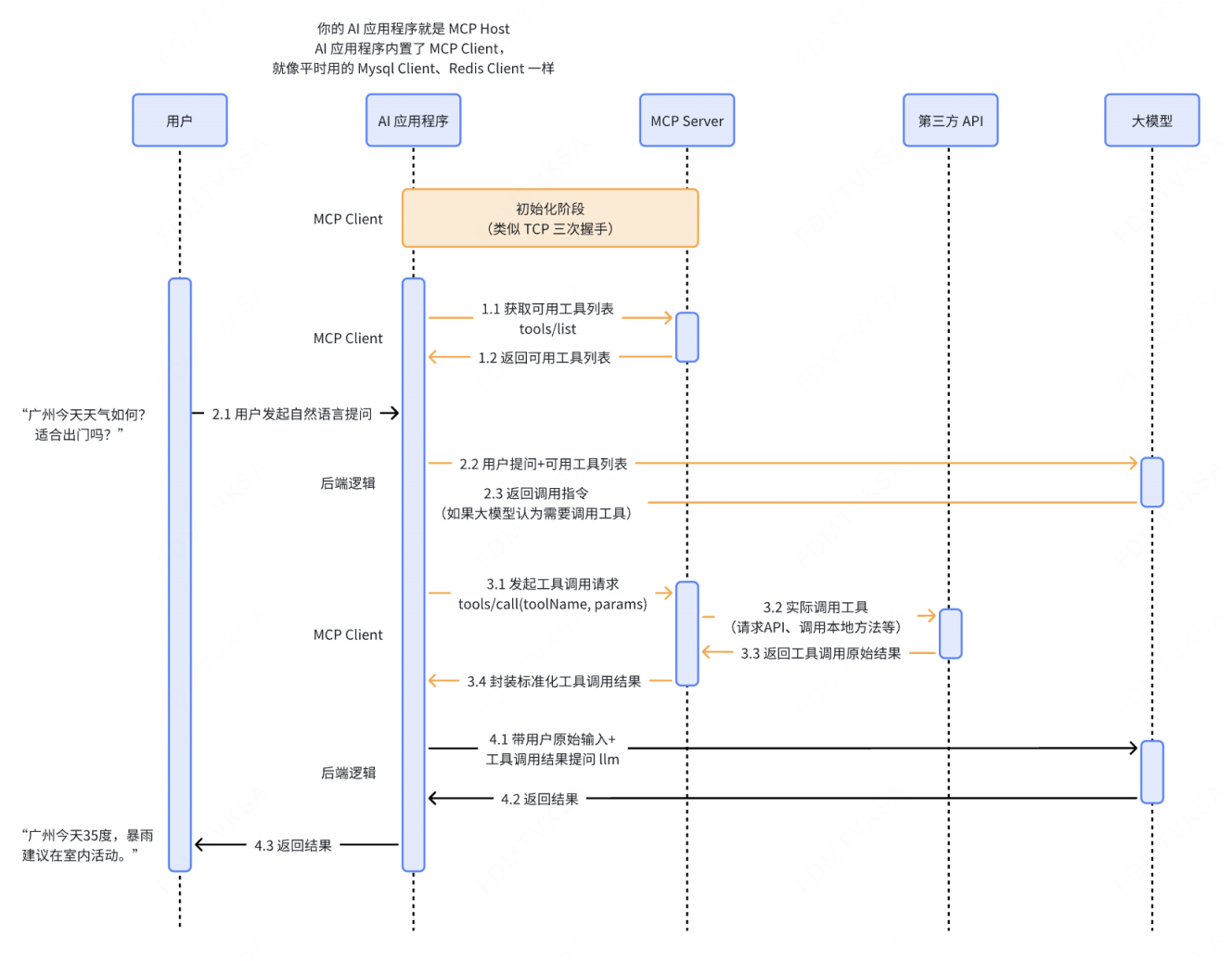
值得一提的是,MCP 协议和 Function Calling 之间绝不是“技术递进”的关系。所谓“MCP 协议会取代 Function Calling”的说法,其实是一种不严谨的表达。
3.8 What’s More?
- 看 MCP 协议官方文档:https://modelcontextprotocol.io/docs/getting-started/intro,思考为何这么设计;
- 通过官方 SDK,尝试编写一个 MCP Server 并启动服务;初始化一个后端应用,创建 MCP Client,完成 Client - Server 完整交互流程的开发。MCP SDK 地址:https://modelcontextprotocol.io/docs/sdk
- 找一个开源的支持了 MCP 协议的 Agent 框架,追溯其中涉及到 MCP Client 、MCP Server 逻辑的所有代码。